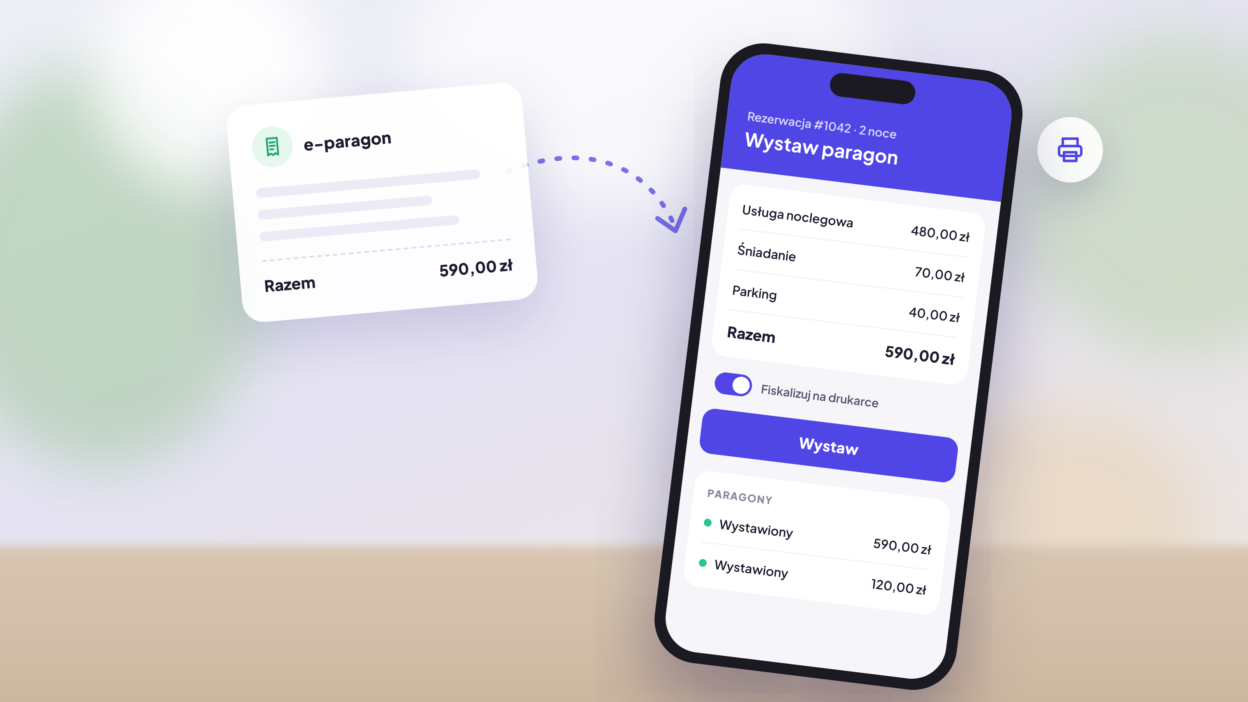
Issuing receipts at the accommodation facility no longer has to mean typing amounts into the cash register. Thanks to the new mobile-calendar integration with e-Paragony, you can issue an e-receipt or a tax receipt directly from the guest reservation – in just a few clicks, from your computer or your phone.
You know the drill: the guest checks out, another person waits at the reception, and you manually enter the price of the stay into a separate program. That takes a few minutes with each departure and is an easy opportunity for error. Now the receipt will be filled with the reservation details, and you just check the items and click „Generate.” In this article, we show how the integration works, what you gain, and how to activate it.
What is e-paragon and why is it worth exhibiting it?
The e-paragon is a paragon in electronic form. Instead of a printed receipt from the cashier, the customer receives it digitally, and you don't have to print or store paper copies.
In accommodation facilities, this is particularly convenient. Guests often pay by bank transfer or online card before arrival, and check-out is done on the spot. A voucher issued directly from the reservation saves reception time and reduces the risk of a mistake in the amount.
E-paragons also have an environmental dimension. According to eparagony.pl estimates, one e-paragon saves about 126 cm² of paper, 26 ml of water and 3 g of CO₂. With several hundred stays per year, this difference quickly adds up.
How to display the e-paragon of the booking in mobile-calendar – step by step
- You are opening a guest reservation.
- The „Accommodation service” item with the price of the stay is already included. If necessary, you can add additional services, such as parking or breakfast.
- With a single click, you decide whether the receipt is to be printed on a printer or displayed as an electronic document.
- You click „Publish” – done.
The status, amount, and tax ID number of each receipt can be found later in the Reservations Finances tab.
Tax Paragon or electronic one?
Integration supports both variants. You decide which one to use with a single slider on each receipt.
| Type | How it is created | When it works |
|---|---|---|
| The Paragon fiscal system | Fiscalized on a fiscal printer | When the guest wants a paper receipt or pays on the spot |
| E-paragon | Displayed electronically, without printing | When the guest pays online or prefers a digital document |
Regardless of your choice, the receipt is linked to the reservation, so you always know which stay it applies to.
The benefits of integrating mobile-calendar with e-Paragon
Less prescribing. The stay details are recorded directly on the receipt, so you don't have to enter the amounts manually and you don't risk making a mistake.
Choosing the type of receipt. Fiscal on a printer or electronically – you decide with each receipt.
Order in the billing. You can see all the booking receipts in one place, along with the status and the fiscal number.
Paragon is also available from the phone. In the mobile app, you can present it directly from the booking form, for example when you hand over the keys to the guest.
Less paper and less archiving. E-paragons do not require printing or storing paper copies in the reception area.
For whom is integration with e-Paragon?
The integration was created with Polish accommodation facilities in mind, which offer packages to individual guests:
- hotels and hostels – where quick service at the reception desk is important,
- guest houses and guest houses – often conducted by one or two people,
- apartments for short-term rental – where the host is rarely present in person and issues the receipt from the phone,
- agrotourism and holiday resorts – with additional services such as breakfast or parking.
If you use mobile-calendar to manage your bookings, you can enable the integration without changing your workflow.
How to configure integration with e-Paragon
To use the integration, you need an account on the e-Paragon service. Setting it up takes a moment – we have described it step by step in the documentation:
Would you rather see how it works? Watch the video on our website. YouTube channels.
The most common questions about e-calendars in mobile-calendar
Do I need an e-paragon account to create e-paragons?
Yes. Integration connects mobile-calendar with your account on e-Paragon.
Can I add other services to the bill other than accommodation?
Yes. The „Accommodation service” item is automatically added, and you can add additional items, such as parking or breakfast, manually before submitting the booking.
Can I print a tax receipt on a printer?
Yes. With each receipt, you choose whether it should be printed on the printer or displayed as an e-receipt.
Where can I check the displayed parameters?
In the Finances section of the reservations page, you will see the status, amount, and tax ID number of each receipt.
Should I print a receipt from my phone?
Yes. In the mobile application mobile-calendar (Android, iOSYou will issue a receipt directly from the booking form.
Does the integration work outside Poland?
No. E-Paragony is a Polish service, therefore the integration is designed for facilities operating in Poland.
Try it today
Integration with e-Paragon is available to all mobile-calendar users in Poland. Log in to the panel and issue the first invoice directly from the booking.
Do you have any questions? Write to us via contact form – we would be happy to help.